App state
State is a way to store values in your app at runtime and share them between components on a screen, without writing anything to your database. It's a powerful tool for making apps dynamic — toggling what's visible, passing a value from one component to another, or driving multi-step interactions.
Setting state
You set state from an action, most commonly the Update State action on a button or after a form submits. Each state value has a key and a value, and you can either set or delete a key.
For example, the screen below stores the clicked row's id in a state key when a user clicks a row in a table, then opens a side panel to edit that record:
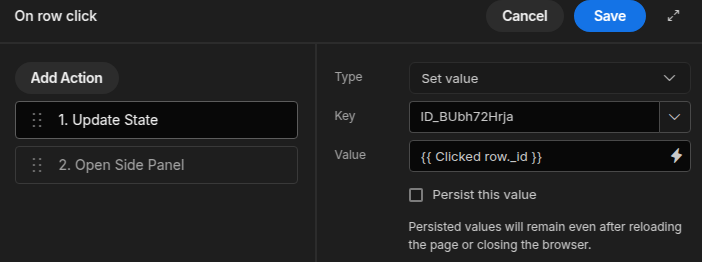
Here the Update State action sets the ID_BUbh72Hrja key to {{ Clicked row._id }},
and a second action opens the side panel that reads it.
Reading state
Once set, state is available as a binding. Reference a key wherever bindings are accepted — in component settings, text, conditions, or queries:
{{ State.selectedId }}
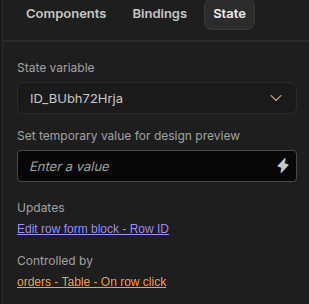
The State tab in the component tree shows the state keys currently in use on a screen, along with what sets each one and what reads it, which makes it easy to see what's available to bind to:
Common uses
- Show/hide components — set a key on click and use it in a component's conditions.
- Pass values between components — store a selection in one component and read it in another (such as a Data Provider that filters by the stored value).
- Drive modals and side panels — track which record a panel should display.